Exception Handling in Python
Writing Robust Code that Handles Errors Gracefully 🛡️✨
What Are Exceptions? 🤔
Exceptions are errors that occur during program execution.
Without proper handling, they crash your program! 💥
ValueError: invalid literal for int() with base 10: 'hello'Why Handle Exceptions? 🎯
- Prevent crashes - Keep your program running
- User-friendly - Show helpful messages instead of cryptic errors
- Data protection - Do not lose work when errors occur
- Professional code - Handle edge cases gracefully
The Basic Pattern: try-except 🎪
Let’s see a real example!
What Makes Software Crash?

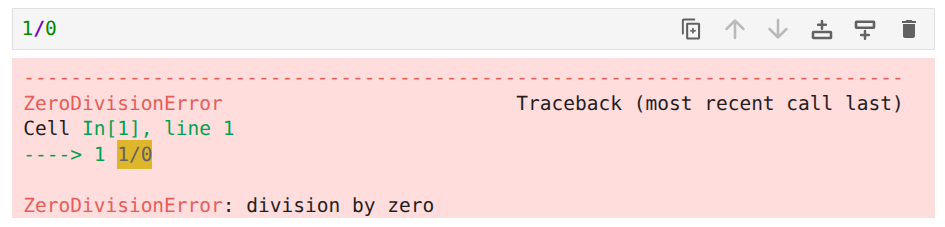
ZeroDivisionErrortype errors result when a value is being divided by zero- Typically the program will crash
- To avoid crashing, programmers will design a conditional statement (
if-else) to check if a divisor is a zero to prevent a crash - Or, they would introduce code for exception handling
Simple Example: Division ➗
Output:
Cannot divide by zero!The program continues running! ✅
A Better Approach: Specific Exceptions 🎯
Why is this better?
- Handle different errors differently
- More precise error messages
- Easier to debug
Common Exception Types 📋
| Exception | When It Happens |
|---|---|
ValueError |
Invalid value (e.g., int("hello")) |
ZeroDivisionError |
Division by zero |
TypeError |
Wrong type (e.g., "5" + 5) |
FileNotFoundError |
File doesn’t exist |
IndexError |
List index out of range |
KeyError |
Dictionary key doesn’t exist |
💻 Challenge #1: Fix the Code
This code crashes. Add exception handling to make it safe:
Hints:
- What if the user enters text instead of a number?
- What if they enter 0?
💡 Solution #1
Getting Error Details: The as Keyword 📝
Example output:
Enter your age: twenty
Invalid input: invalid literal for int() with base 10: 'twenty'
The else Clause ✨
Runs only if no exception occurs:
The finally Clause 🏁
Runs no matter what - even if there’s an exception:
Perfect for cleanup operations! 🧹
Complete Exception Structure 🏗️
💻 Challenge #2: File Reader
Create a function that safely reads a file:
Requirements:
- Handle
FileNotFoundError - Always close the file (use
finally) - Return
Noneif file doesn’t exist
💡 Solution #2
Multiple Exceptions in One Line 🎯
When the same action handles multiple errors:
Real-World Example: Calculator 🧮
def safe_calculator():
    try:
        num1 = float(input("First number: "))
        operator = input("Operator (+, -, *, /): ")
        num2 = float(input("Second number: "))

        if operator == "+":
            result = num1 + num2
        elif operator == "/":
            result = num1 / num2
        # ... more operators

        print(f"Result: {result}")
    except ValueError:
        print("Please enter valid numbers!")
    except ZeroDivisionError:
        print("Cannot divide by zero!")
💻 Challenge #3: List Access
Fix this code to handle invalid indices:
Bonus: Also handle if index is not a number!
💡 Solution #3
def get_item(my_list, index):
    try:
        item = my_list[index]
        return item
    except IndexError:
        print(f"Index {index} is out of range!")
        return None
    except TypeError:
        print("Index must be an integer!")
        return None

# Test it:
fruits = ["apple", "banana", "cherry"]
print(get_item(fruits, 5))    # Index error
print(get_item(fruits, "2"))  # Type error
Raising Your Own Exceptions 🚀
So far we’ve been catching exceptions. But you can also raise them!
Why raise exceptions?
- Signal that something is wrong in your code
- Enforce rules and constraints
- Communicate errors to calling code
- Make your functions fail early and clearly
The raise Statement 📢
Basic syntax:
Common built-in exceptions to raise:
ValueError- Invalid valueTypeError- Wrong typeRuntimeError- General runtime errorNotImplementedError- Feature not implemented yet
Example: Validating Input 🔍
Output: Error: Age cannot be negative!
When to Raise Exceptions 🎯
- Invalid input - User provides bad data
- Violated preconditions - Function requirements not met
- Impossible operations - Can’t complete the requested action
- Resource problems - File missing, network down, etc.
Principle: Raise exceptions when you can’t fix the problem, but the caller might be able to!
Practical Example: Division Function ➗
def safe_divide(numerator, denominator):
    """Divide two numbers with validation."""

    if not isinstance(numerator, (int, float)):
        raise TypeError("Numerator must be a number")

    if not isinstance(denominator, (int, float)):
        raise TypeError("Denominator must be a number")

    if denominator == 0:
        raise ValueError("Cannot divide by zero")

    return numerator / denominator
Using the Division Function 🧮
Output:
Result: 5.0
Value error: Cannot divide by zero
Custom Exception Classes 🎨
Create your own exception types:
💻 Challenge #4: Validate Email
Create a function that validates an email address:
💡 Solution #4
def validate_email(email):
    if not email:
        raise ValueError("Email cannot be empty!")

    if "@" not in email:
        raise ValueError("Email must contain @")

    if "." not in email.split("@")[1]:
        raise ValueError("Email must have domain extension")

    return True

try:
    validate_email("test@example.com")
    print("✅ Valid email!")
except ValueError as error:
    print(f"❌ {error}")
Real-World: API Request Handler 🌐
import requests

def fetch_data(url):
    try:
        response = requests.get(url, timeout=5)
        response.raise_for_status()
        return response.json()
    except requests.Timeout:
        print("Request timed out!")
    except requests.ConnectionError:
        print("Network connection failed!")
    except requests.HTTPError as e:
        print(f"HTTP error: {e}")
    except Exception as e:
        print(f"Unexpected error: {e}")
    finally:
        print("Request completed")
Best Practices ⭐
- Be specific - Catch specific exceptions, not all errors
- Do not hide errors - Log or display useful information
- Clean up resources - Use
finallyfor files, connections - Fail gracefully - Provide helpful error messages
- Do not overuse - Not everything needs try-except
- Document exceptions - Tell users what errors to expect
Common Mistakes to Avoid ⚠️
💻 Big Challenge: Bank Account 🏦
Create a BankAccount class with exception handling:
class InsufficientFundsError(Exception):
    pass

class BankAccount:
    def __init__(self, balance=0):
        # Initialize account
        pass

    def deposit(self, amount):
        # Add exception handling for negative amounts
        pass

    def withdraw(self, amount):
        # Raise InsufficientFundsError if balance too low
        # Raise ValueError if amount is negative
        pass
💡 Big Solution
class InsufficientFundsError(Exception):
    pass

class BankAccount:
    def __init__(self, balance=0):
        if balance < 0:
            raise ValueError("Initial balance cannot be negative")
        self.balance = balance

    def deposit(self, amount):
        if amount <= 0:
            raise ValueError("Deposit amount must be positive")
        self.balance += amount
        return self.balance

    def withdraw(self, amount):
        if amount <= 0:
            raise ValueError("Withdrawal amount must be positive")
        if amount > self.balance:
            raise InsufficientFundsError(
                f"Insufficient funds. Balance: ${self.balance}"
            )
        self.balance -= amount
        return self.balance
Testing the Bank Account 💰
try:
    account = BankAccount(100)
    print(f"Balance: ${account.balance}")

    account.deposit(50)
    print(f"After deposit: ${account.balance}")

    account.withdraw(200)  # This will fail!

except ValueError as e:
    print(f"Invalid operation: {e}")
except InsufficientFundsError as e:
    print(f"Transaction failed: {e}")
Quick Reference Card 📋
| Clause | Purpose | When It Runs |
|---|---|---|
try: |
Code that might fail | Always attempted |
except: |
Error handling | Only if exception occurs |
else: |
Success code | Only if NO exception |
finally: |
Cleanup code | ALWAYS runs |
Key Takeaways 🎓
- Exceptions help create robust, user-friendly programs
- Use
try-exceptto handle errors gracefully - Be specific with exception types
- Always clean up resources with
finally - Raise exceptions to signal problems in your code
- Good error handling = professional code! 💼